GPT Image 2.6 GIF examples
All three came from the tool above, running on GPT Image 2.6.


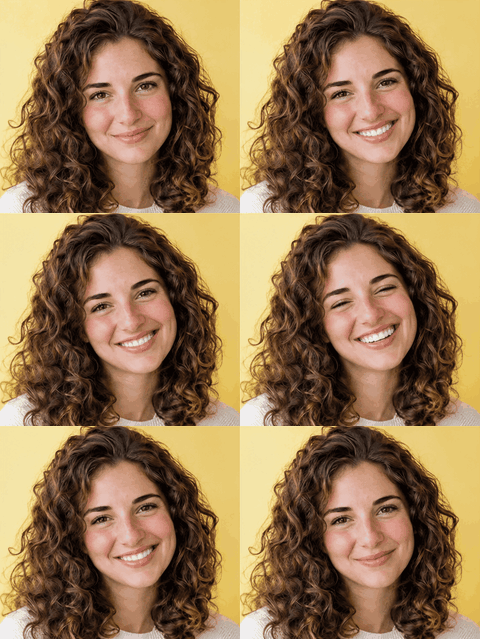
| GIF | What we entered | Movement |
|---|---|---|
| Cat | "a chubby orange cartoon cat" | Dance |
| Flame | "a small cartoon flame with a cute face" | "flickers and sways gently" |
| Portrait | One photo, with Keep the photo | Nod |
What's new in GPT Image 2.6
| Feature | What it does | Where |
|---|---|---|
| Animated GIF | Turns a prompt or an image into a short looping GIF. In ChatGPT you can also change the speed and edit single frames. | ChatGPT, API |
| SVG export | Returns a vector file with editable paths, shapes and colors. | API |
| Markup edits | Circle a spot on an image and only that part changes. | ChatGPT, API |
| Complexity setting | Sets how much planning the model does before drawing. | API |
| Reference images | Keeps pictures of you, your pets or characters ready to reuse. | ChatGPT |
| Faster generation | OpenAI says the 2.6 API models generate images 50% faster than before. | API |
OpenAI says Images 2.6 is available in ChatGPT and Codex on every plan, on web, desktop and mobile. Reports say the GIF feature is reaching ChatGPT accounts in stages, so it may not be on yours yet. OpenAI's announcement doesn't say whether ChatGPT itself can export SVG; it lists SVG among the developer features.
How to try GPT Image 2.6
- Here, free, for a GIF. The tool on this page runs on GPT Image 2.6. Your first GIF is free when you sign in, and you can fit it to Discord, Slack or Twitch. It makes GIFs only, not still images. See how it works here.
- In ChatGPT. Ask for an image or a GIF. No separate purchase is mentioned for any plan.
- Through the API. Use the model
gpt-image-2.6-flareor the Sunburst version on the image generation endpoint. OpenAI says your organization may need to be verified first.
GPT Image 2.6 vs GPT Image 2.5
| GPT Image 2.6 | GPT Image 2.5 | |
|---|---|---|
| Animated GIF | Yes, through the Image API | Not mentioned on its model page |
| SVG output | Yes, through the Image API | Not mentioned on its model page |
| Complexity setting | Low, medium or high | Not documented |
| Markup edits | Yes | Yes, on supported models |
| Speed | OpenAI says 50% faster than before | |
| Price per 1M tokens | $5 text input, $8 image input, $30 image output | Same |
| Batch API | Not listed | Yes, $15 per 1M image output tokens |
Choose 2.6 for GIF, SVG or speed. Stay on 2.5 if you rely on the Batch rate. OpenAI's guide lists xhigh and max quality settings for 2.5 but doesn't compare image quality between the two, and we haven't seen independent tests yet.
GPT Image 2.6 GIF limits
These are the API settings in OpenAI's guide. ChatGPT's own GIF screen may offer different controls.
| Setting | Values | Default |
|---|---|---|
output_format |
gif |
|
frame_count |
2 to 64 frames | 9 |
frame_duration_ms |
20 to 2,000 ms per frame | 200 |
size |
auto, or width × height in multiples of 16 |
auto |
- The default is a 1.8 second loop: 9 frames at 200 ms.
- Generation only. The image edit endpoint doesn't output GIF, and the guide doesn't say whether the generation endpoint takes an input image for one.
- No streaming, partial images, custom compression or
prompt_rewriterfor GIFs. - Frames share a pixel budget, so 64 frames at the largest size won't be accepted.
- Transparency isn't documented for GIF. The guide's transparency notes cover PNG and WebP only. In our tests, asking for a transparent background did return GIFs with a clear background.
GPT Image 2.6 SVG
Set output_format to svg on the generation endpoint, one image per request. The API draws a reference image first, then writes the SVG from it. The result is static vector content with no scripts, external resources or embedded raster images, so it's safe to edit and scale. OpenAI suggests it for graphics that need editable paths, such as icons and illustrations.
Two limits: the edit endpoint can't output SVG, and an SVG can't be used as an input for edits. That also means this isn't a way to convert your own PNG into a vector through the API, at least as documented today. Check paths, layers and spelling before you use a result, because no independent quality tests exist yet.
Flare vs Sunburst
| Flare | Sunburst | |
|---|---|---|
| Built for | Fast iteration | Detailed work |
| OpenAI's claim | As little as about 6 seconds at low quality | Keeps people and products more consistent across edits |
| Better layouts | Posters and product images | More detail at medium and high quality |
| Price per token | Same | Same |
Start with Flare for drafts and anything you'll regenerate a lot. Use Sunburst for final images and for edits over several rounds. These claims come from OpenAI; we haven't seen independent benchmarks yet.
Photo to GIF on this site uses a third tier, Economy: the cost-efficient 2.6 variant, limited to 1K, and the only tier that returned a GIF from a photo in our tests. It's slower. Economy runs took about 1 to 3 minutes, while the Flare GIF we timed took about 20 seconds.
GPT Image 2.6 pricing
| Token type | Price per 1M tokens | Cached |
|---|---|---|
| Image output | $30 | |
| Image input | $8 | $2 |
| Text input | $5 | $1.25 |
Flare and Sunburst cost the same, and the rates match GPT Image 2.5. OpenAI's pricing page gives no flat price per image or per GIF, and no Batch rate for 2.6 yet. For an SVG you pay for the reference image plus the tokens used to write the file. On ChatGPT plans, the announcement mentions no extra charge.
What a generated GIF still needs
A model gives you a GIF. A platform gives you a limit. Most of the work is getting from one to the other, and it's the same whichever model made the file.
| Where it goes | Pixels | File limit | Frames |
|---|---|---|---|
| Discord emoji | 128 × 128 | 256 KB | |
| Discord sticker | 320 × 320 | 512 KB | |
| Discord profile banner | 600 × 240 | 10 MB | |
| Slack emoji | 128 × 128 | 128 KB | 50 |
| Twitch animated emote | 112 × 112 | 1 MB | 60 |
In our tests, 9-frame GIFs came back at about 414 × 414 on the Economy tier and 512 × 512 on Flare, at roughly 350 KB to 1 MB. That's far more than an emoji can hold. To fit, use the free GIF resizer or GIF compressor. Both run in your browser, and they work on a GIF from ChatGPT, this site or anywhere else.
Make a GIF here today
Photo to GIF now generates with GPT Image 2.6, on its Economy tier. Describe a character or drop a photo and you get a real GIF of about nine frames, usually in 1 to 3 minutes. From a photo, it can keep the picture as it is or redraw the subject as a sticker on a clear background. Then fit it to Discord, Slack or Twitch in one click. If Economy is busy for more than a few minutes, the run switches to a backup at no extra charge: Flare for a description, or another model for a photo, which makes a six-frame loop.
Sources
Checked on November 5, 2026. Things will change quickly in the first weeks.
- OpenAI image generation guide
- OpenAI API pricing
- OpenAI: Introducing Images 2.6
- OpenAI's announcement of ChatGPT Images 2.6
- GPT Image 2.6 Flare model page and GPT Image 2.5 Flare model page
CropDen is an independent site, not affiliated with or endorsed by OpenAI.